Error Codes
Some detector faults will display an Error Code on the Target ID Number field. Try the recommended actions shown below before contacting an Authorised Service Center.
Coil Disconnect
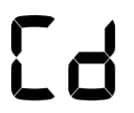
'Cd' will appear on the Target ID Number in the event of a Coil Disconnect Error In the event of a Coil Disconnect Error, follow these steps:
- Check that the coil connector is connected properly at the back of the control unit.
- Check the coil cable for damage.
- Check the coil connector pins are free of dirt and debris.
- Check the coil for visible signs of damage.
- Try another coil if you have one available.
- Perform a Factory Reset by powering off the detector, then press and hold the Power button for 7 seconds.
- If the error still remains, return the detector to your nearest Authorised Service Centre for repair.
System Error
System Error code ‘E’ is accompanied by an Error Code Number e.g ‘E2’. The detector will shut down 5 seconds after reporting a system error.

Example Error Code ‘E2’ displayed on the Target ID Number In the event of a System Error, follow these steps:
- Restart the detector to determine if the error still remains.
- Confirm the coil is attached correctly.
- Perform a Factory Reset by powering off the detector, then press and hold the Power button for 7 seconds.
- If the error still remains, return the detector to your nearest Authorised Service Centre for repair.
Troubleshooting
The detector does not turn on or turns off by itself (with or without ‘bF’ indication)
- Replace the batteries.
Erratic/excessive noise
- Move away from local sources of Electromagnetic Interference (EMI).
- Restart the detector and wait for Automatic Noise Cancel to complete.
- Reduce the Sensitivity level.
No sound – Wired headphones
- Check that the detector is on, and start-up has been completed.
- Check that the headphones are plugged in.
- Check that Volume is set to an audible level.
- Unplug the headphones and confirm that the detector speaker is audible.
- If available, try using a different set of headphones.
No sound – ML 80 Headphones
- Check that the headphones are turned on.
- Check that detector Bluetooth is turned on and paired with Bluetooth headphones (i.e. the Bluetooth icon is steady on).
- Check that the headphones are charged.
- Check that the detector Volume is set to an audible level.
- Ensure the volume control on the headphones is set to an audible level.
- Try a different set of Bluetooth headphones.
- Try wired headphones.
ML 80 Headphones will not pair
- Try powering off the ML 80 headphones and then re-pair.
- Ensure the headphones are within 1 meter (3-feet) of the detector control unit, with no obstructions between the headphones and detector (including your own body).
- Move away from sources of interference such as mobile phones.
- If there are many other Bluetooth devices nearby, pairing may take longer. Move away from the area and try to pair again.
- Perform a factory reset on the headphones and attempt to re-pair to the detector.
- Pair the detector with different Bluetooth headphones, then attempt to re-pair ML 80 headphones to the detector.
Distortion/crackling heard in ML 80 Headphones when connected via Bluetooth
- Reduce the volume on the headphones until the distortion is removed. Increase detector volume if required to compensate for the reduced volume.
Factory Reset
The Factory Reset function returns all detector settings, Search Modes, and Discrimination Patterns to their Factory Preset state.
- Ensure the detector is turned Off.
- Press and hold the Power button (for approximately 7 seconds).
 The Power button NOTE: If another button is pressed whilst the power button is held down, the detector will not perform the Factory Reset and will start normally once all buttons have been released.
- 'FP’ will appear on the Target ID display, indicating that Factory Presets have been restored.
 'FP' will appear on the Target ID display when Factory Presets are restored.
- Release the Power button. Automatic Noise Cancel will begin when Factory Reset is complete.


